Powerful. Fast. Smart. Made for Mac.
Imij is an image editor for Apple Silicon Macs. Layers, selections and edits you can always change later, plus AI that removes, fills and colourises.
Powerful.
Everything stays editable.
Build pictures from layers, masks and groups. Adjustments, filters and effects sit on their own layers, so you can change them or take them off at any time.
- Layers with masks, groups and 15 blend modes
- Adjustment and filter layers, plus editable shadows, glows and outlines
- Text and shapes that stay sharp, including curved text
- Opens your files: PSD, RAW, HEIC, AVIF, TIFF and more
Fast.
Smooth at any size.
Zoom from the whole picture to a single eyelash and pan without waiting. Turn the view like a sheet of paper. Find any command by typing its name.
- Pinch, scroll and twist on the trackpad
- Command palette for every command and tool
- History to jump back to any step
Smart.
AI that does the fiddly bits.
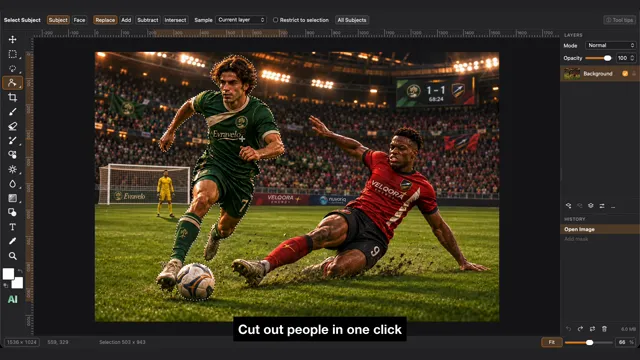
Select a person with one click, paint over something to remove it, or describe what should fill a space. Or ask AI Assist to do a whole job for you.
- Select Subject and Remove run on your Mac
- Generative Fill with Gemini, GPT Image or your own Stable Diffusion server
- AI Assist carries out requests using Imij's own tools
- Optional: nothing goes to the cloud unless you choose it
Made for Mac.
A real Mac app.
Native menus and shortcuts, Finder and the Dock, Open Recent and autosave. Colourise and the other on-device models run privately on Apple Silicon.
- On-device AI: Colourise and Remove never send your pictures anywhere
- Native menus and shortcuts, Finder, the Dock and autosave
- Works with Claude and other AI apps through MCP
And plenty more
- Magic Wand
- Lasso
- Clone Stamp
- Spot Heal
- Recolour
- Dodge & Burn
- Smudge
- Perspective Crop
- Warp
- Levels & Curves
- Oil Painting
- Halftone
- Pencil Sketch
- Lens Blur
- Upscale
- Macros
- Develop RAW
- Placed images
- Command palette
- Autosave & recovery
See it in action
All videos on YouTube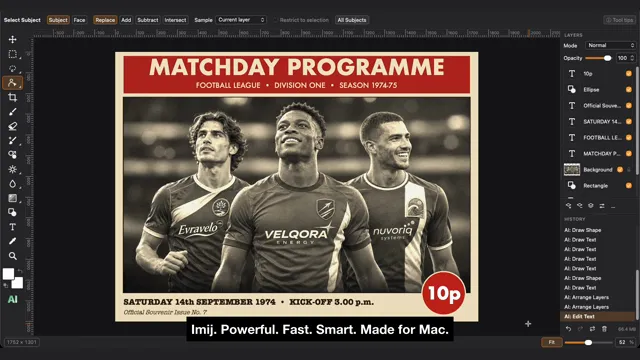
Get Imij
For Macs with Apple Silicon, macOS 12 or later. Some features need a newer macOS.
Coming soon